Tools SDK
The Tools SDK (Python package agents_tools) lets an agent load tools from the Tools Registry and run them in-process. Its main class is AgentTools.
from agents_tools import AgentTools

tools = AgentTools(tools_db_url="http://<tools-registry>:6000")
tools.add("text-stats")
print(tools.execute_tool_by_id("text-stats", {"text": "to be or not to be"}))
# {'word_count': 6, 'unique_words': 4, 'top_words': ['be', 'to', 'not']}
Architecture
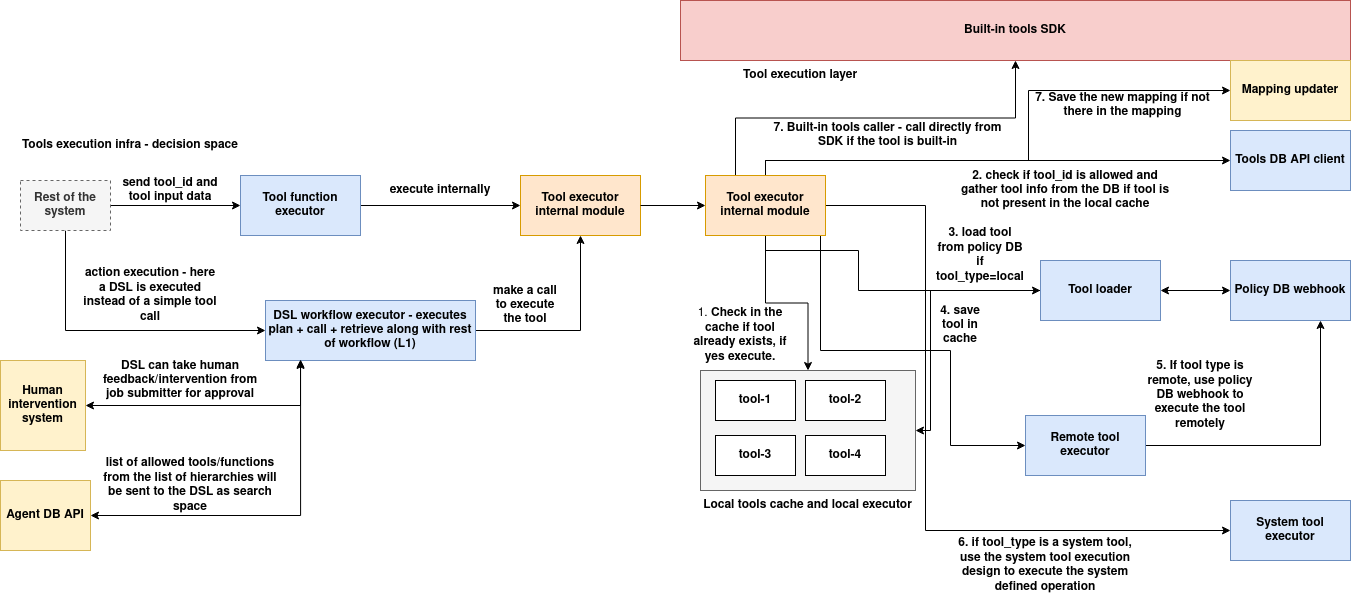
The diagram shows the full target design. The current agents_tools release implements this subset:
| Component in diagram | In agents_tools today |
|---|---|
| Tools DB API client | ToolsRegistrySDK: fetches tool records via GET /tools/<id> |
| Tool loader + local tools cache | ToolsExecutionManager: downloads, installs, and keeps one instance per tool |
| Local Python / binary execution | LocalToolExecutor / BinaryToolExecutor |
| Tool selection | OpenAIToolCaller: LLM (OpenAI function calling) picks a tool and formats its input |
| Org-scoped allowed tools/actions | AgentAllowedToolStore / AgentAllowedToolActionStore (in-memory, see limitations) |
| DSL workflow selection, Policy DB webhook, remote/system executors | Not in this package. System tools are called through the RPC System. |
How a call flows:
add(tool_id)  ──>  GET /tools/<tool_id>  ──>  download tool_source_code_link
                                          ──>  pip install requirements.txt  (python)
                                          ──>  AgentSpaceV1Tool(tool_id, record)
execute_tool_by_id(tool_id, input)  ──>  instance.execute(input)  ──>  result
Installation
cd functions-tools/src/tools/tools_executors/tools_executor_lib
pip install .          # or: pip install -e .  for development
This installs agents_tools together with its dependencies, requests and openai.
python -c "from agents_tools import AgentTools; print('ok')"
Quick start
1. Load and run a tool
from agents_tools import AgentTools

tools = AgentTools(tools_db_url="http://<tools-registry>:6000")

# Load once: downloads the code, installs requirements, creates the instance.
# The optional dict overrides the tool's registered tool_parameters.
tools.add("text-stats", {"top_n": 2})

result = tools.execute_tool_by_id("text-stats", {"text": "the cat and the hat and the bat"})
print(result)
# {'word_count': 8, 'unique_words': 5, 'top_words': ['the', 'and']}
Always call add() first
execute_tool_by_id() on a tool that hasn't been added raises TypeError: register() missing 1 required positional argument: 'parameters' in the current release. Call add(tool_id) before executing.
2. Send a management command
tools.execute_command("text-stats", "set_top_n", {"top_n": 1})
print(tools.execute_tool_by_id("text-stats", {"text": "the cat and the hat"}))
# {'word_count': 5, 'unique_words': 4, 'top_words': ['the']}
execute_command calls the tool's execute_command(command_name, data) method. In the current release its return value is not passed back (you get None), so use commands for side effects such as reconfiguration.
3. Let an LLM pick the tool
Pass an OpenAI API key to enable search. Only tools loaded with add() are candidates.
tools = AgentTools(
    tools_db_url="http://<tools-registry>:6000",
    openai_api_key="sk-...",
)
tools.add("text-stats")
tools.add("weather-forecast")

# Which tool fits?
print(tools.search_tool("How many words are in this paragraph?"))
# 'text-stats'

# Pick the tool, reshape the input to its schema, run it
result = tools.search_and_execute_tool(
    prompt="Give me word statistics",
    input_dict={"body": "the quick brown fox jumps over the lazy dog"},
)
print(result)
# {'word_count': 9, 'unique_words': 8, 'top_words': ['the', 'brown', 'dog']}
The LLM sees each tool's tool_id, tool_search_description, tool_tags, and tool_api_spec.entrypoints.execute.input. It must choose one tool (tool_choice="required"), and its arguments are passed straight to execute(). Write a clear description and a precise JSON Schema; see Creating a Tool → spec.json. The default model is gpt-4o-mini.
4. Complete example
from agents_tools import AgentTools

REGISTRY = "http://<tools-registry>:6000"

tools = AgentTools(tools_db_url=REGISTRY)

for tool_id in ["text-stats"]:
    tools.add(tool_id)

docs = [
    "ServiceGrid makes tools discoverable",
    "Agents load tools on demand and tools run locally",
]
for d in docs:
    stats = tools.execute_tool_by_id("text-stats", {"text": d})
    print(f"{stats['word_count']:>3} words  top={stats['top_words']}")
API reference
AgentTools(tools_db_url, openai_api_key=None)
| Parameter | Description |
|---|---|
tools_db_url |
Base URL of the Tools Registry, e.g. http://tools-registry:6000 |
openai_api_key |
Optional. Required only for search_tool / search_and_execute_tool. |
Methods
| Method | Returns | Description |
|---|---|---|
add(tool_id, parameters={}) |
None |
Fetches the record, merges parameters into tool_parameters, then downloads and initialises the tool. Does nothing if the tool is already loaded. Raises on failure. |
execute_tool_by_id(tool_id, input_data) |
tool output | Runs execute(input_data) on the loaded instance. |
execute_command(tool_id, command, data) |
None (see above) |
Calls the tool's execute_command. |
search_tool(prompt) |
tool_id |
Asks the LLM which loaded tool fits prompt. |
search_and_execute_tool(prompt, input_dict) |
tool output | LLM selects a tool and formats input_dict to its schema, then the tool runs. |
add_tool_to_org(tool_id, derived_from, mapping_org_id) |
bool |
Adds the record to the in-memory org tool store. See limitations. |
create_action(action_type, tool_ids, action_tags, action_metadata, action_search_description, action_dsl, derived_from, mapping_org_id) |
bool |
Groups org tools into a named action (in-memory). Returns False if any tool_ids are not in the org store. |
Each tool is loaded once per AgentTools instance, under the key instance:<tool_id>. The loaded records are available as tools.executor.tool_instances[...]["tool_data"].
Input validation
The executor includes a validator for tool_api_spec, but it is disabled in the current release. Validate input inside your tool's execute() if you need to.
Lower-level classes
You rarely need these directly.
ToolsRegistrySDK(base_url) is an HTTP client for the registry.
from agents_tools import ToolsRegistrySDK

reg = ToolsRegistrySDK("http://<tools-registry>:6000")
record = reg.get_tool_by_id("text-stats")      # GET /tools/<id>
Only get_tool_by_id matches the current registry API. The client's other methods (create_tool, update_tool, delete_tool, execute_query, search_by_tags, search_advanced, list_all_tools) call routes the registry does not expose. Use the registry REST API directly for those operations.
ToolsExecutionManager(base_url) is the loader and cache used by AgentTools.
| Method | Description |
|---|---|
register(instance_name, tool_id, parameters) |
Fetch, download, and initialise |
execute(instance_name, input_data) |
Run the tool |
execute_command(instance_name, command_name, command_data) |
Run a command |
unregister(instance_name) |
Drop the instance |
get_instance_data(instance_name) |
Return the tool record |
Runtimes
LocalToolExecutor(download_url, tool_id, tool_data)downloads or extracts the archive into/tmp/<uuid>/, installscode/requirements.txt, and importscode/function.py:AgentSpaceV1Tool.download_urlcan be an HTTP URL, a local.zip/.tar.gz, or a local directory (which is copied as thecode/folder).BinaryToolExecutor(download_url, tool_id, tool_data)extracts the archive and runscode/<binary> '<json>' <output-file>. See binary tools.
OpenAIToolCaller(registry_base_url, openai_api_key, model="gpt-4o-mini") provides the LLM selection used by AgentTools. resolve(prompt, input_dict=None, tools=None) returns (tool_id, formatted_args) without executing anything.
Current limitations
| Area | Behaviour today | Workaround |
|---|---|---|
| Auto-registration | execute_tool_by_id on a tool that wasn't added raises TypeError |
Call add() first |
| Binary tools | execute_tool_by_id fails with 'BinaryToolExecutor' object has no attribute 'evaluate' |
Use BinaryToolExecutor(...).execute() directly (example) |
execute_command |
Always returns None for Python tools |
Use it for side effects only |
add_tool_to_org / create_action |
add_tool_to_org always returns False (the registry client is created without a URL), so create_action can't find any tools |
Not usable yet |
OpenAIToolCaller.search_tool / .search_and_execute_tool (standalone) |
Call GET /tools, which the registry doesn't serve |
Use the AgentTools methods, which search only loaded tools |
| Input validation | Disabled | Validate in execute() |
| Isolation | Tools run in the agent's process, and their requirements are installed into the agent's Python environment | Load only trusted tools |